Before Grok 4 launch I was using Claude and ChatGPT a lot.

Now I use Grok 4 more and it has automated most of my tasks.

Here are 10 powerful prompts I can’t live without and how you can use them to automate your boring tasks:
1. Deep Research Snapshot

Turn Grok 4 into your on-demand analyst for complex topics.

“Act as a research assistant. Summarize the top 3 developments in {specific field, e.g. 'AI policy' or 'climate tech'} from the past 90 days. Include source citations, key players, and potential second-order effects for professionals in the space.”
2. Strategic Briefing (in Plain English)
Get up to speed without digging through whitepapers.
“Explain {advanced topic or trend} in plain terms for someone smart but non-technical. Use metaphors, give real-world use cases, and include 1 controversial take within the expert community.”3. Industry Pulse Report
See what the smartest people in your space are tracking today.
“Give me a real-time pulse check on {industry or niche}. Include trending technologies, notable events from the last 2 weeks, and 3 key shifts that could impact operators or investors.” https://t.co/wUrwO287VJ4. Skills Accelerator
Compress weeks of learning into one powerful prompt.
“Break down {complex skill or tool, e.g. ‘generative design in Figma’ or ‘prompt engineering’} into a 5-day crash course. Each day should have a goal, practice task, and 1-2 advanced tips for faster learning.”5. Decision Clarity Framework
Make smarter calls faster.
“I’m deciding between {option A} and {option B}. Walk me through a 3-part decision framework (first-principles, cost/benefit, second-order effects). Include examples from people in similar situations.” https://t.co/O53ZJODP0E6. Intellectual Sparring Partner
Sharpen your thinking through productive disagreement.
“Play devil’s advocate on my belief: ‘{insert belief or strategy you hold}’. Challenge it using evidence, opposing views, and ethical considerations. Make me defend it or refine it.” https://t.co/ES7AwQ0s8J7. Narrative Builder for Presentations
Craft story-driven slides that land.
“Help me build a compelling narrative around {project, idea, or insight}. Use a 3-act structure: tension (problem), resolution (solution), and transformation (outcome). Include 3 slides worth of structure per section.”8. Zero-to-One Ideation
Break creative inertia in one go.
“Give me 10 non-obvious content or product ideas in the {niche} space that combine current trends, underserved audiences, and emerging platforms. Rank them by uniqueness and execution difficulty.” https://t.co/m2s4Qz5rEN9. Strategic Planning Template
Think like a founder or operator not a task manager.
“Help me build a strategic plan for {goal}. Include: core objective, 3 key milestones, 5 leverage points, and potential risks. Format it as a one-page brief I can pitch or act on.” https://t.co/Qiq79vJ4h5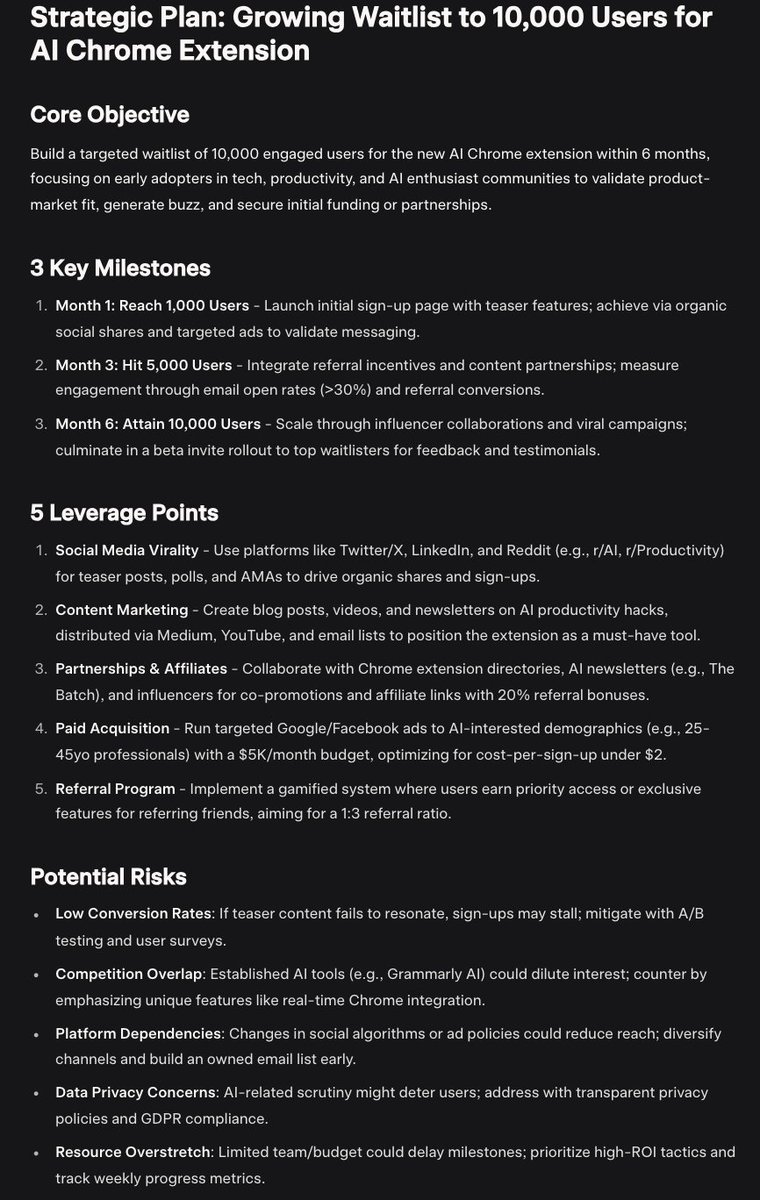
10. Learning Integration Protocol

Turn insight into real-world action.

“I just learned about {topic}. Help me integrate it by outlining: (1) what it changes about my current approach, (2) 3 small actions I can take this week, (3) 1 reflective question to track long-term impact.”
Master AI and future-proof your career.

Our newsletter, The Shift, delivers breakthroughs, tools, and strategies you won't find anywhere else – 5 days a week.

Subscribe today: https://t.co/cPb4Ln9lm1

Plus, get access to 2000+ AI Tools and free AI courses when you join