3 months ago, building an app required:

- 6 months of development
- $300K budget
- Team of 5 devs
- Prayer that nothing breaks

Yesterday, I created and deployed CoachFlow in 22 minutes.

Workflow: ChatGPT - Lovable - Supabase - Cursor

step-by-step how:
I'll be using https://t.co/G1zOY8QxUU as the main engine for this workflow.

Lovable’s new AI agents handled UI logic, interactions, and flow like a real senior dev—no boilerplate, just production-ready screens.
1. start with the vision

before opening any tool, get 3 things clear:

- who’s it for?
- what problem does it solve?
- what makes it feel magic?

I use ChatGPT for all this

for CoachFlow, it’s an AI coach that helps you stay on track with goals, reflect daily, grow consistently https://t.co/yUioeYW8Ic
2. map the experience

now break down how people will use it:

- set goals
- track habits
- write reflections
- get insights + motivation

this is your user journey. keep it simple. focus on what really matters.
3. pick your 5 must-have screens

don’t overbuild.

CoachFlow’s MVP only needs:

- home dashboard
- goal + habit tracker
- daily reflection journal
- weekly insights
- settings + personalization

less = faster shipping. https://t.co/yOszBIvC38
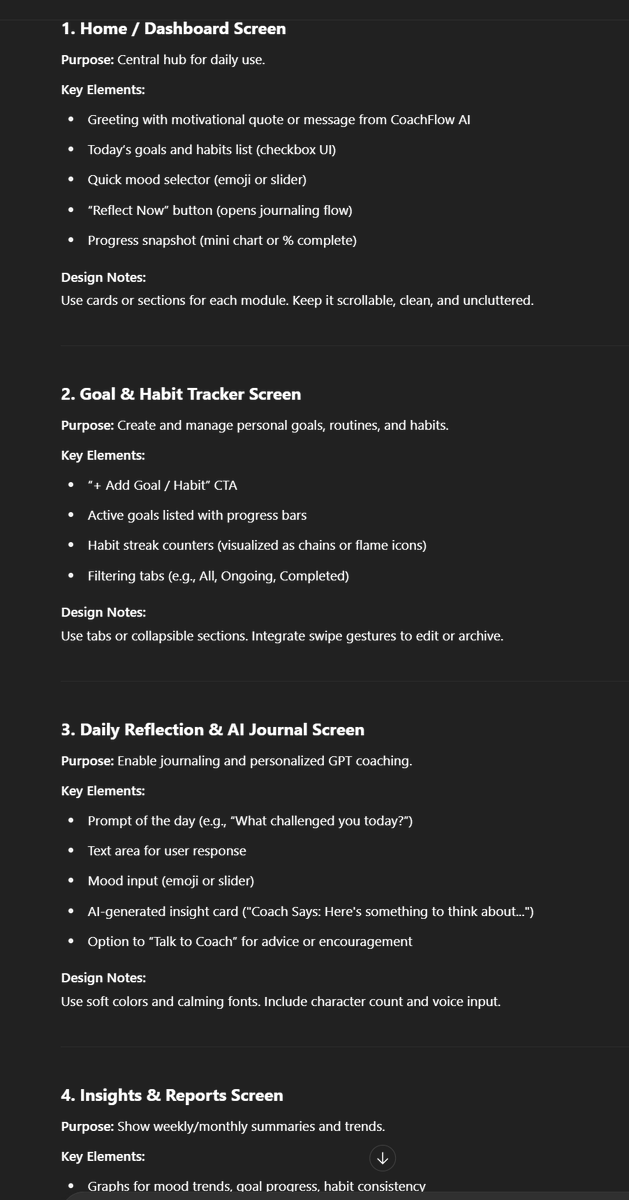
4. define the UI with GPT

get ChatGPT to describe each screen layout.

ask it to include:

- components
- user actions
- nav structure
- bonus details like mood sliders or coach tone toggles

this becomes your blueprint for dev + design.

(prompt in ALT) https://t.co/3gTeKAaRLk

5. choose the vibe

we went with a modern glassmorph style and bright gradients:

🔹 glowing buttons
🔹 soft cards
🔹 vibrant colors (think cosmic bloom, vaporwave, arctic aurora)

this makes the experience feel alive, not another boring productivity app. https://t.co/y7Ljnj3ST5
6. build the frontend in Lovable

https://t.co/dZUp9LVRDU makes it easy to bring your UI to life—without writing boilerplate.

here you can:

- import GPT layouts
- create interactions + flow logic
- preview how the app feels

in hours, you get a working PWA, not just mockups. https://t.co/knLHmb3wzb
7. backend powered by Supabase

connect your frontend to real data with Supabase.

you get:

- email auth
- journaling + habit database
- AI prompts storage
- file uploads (for voice-to-text reflections)

zero DevOps. everything just works. https://t.co/mx9VBR9ZLY
8. use Cursor to make edits

in Cursor, you can:

- refactor screens in seconds
- add components with prompts
- test new logic live
- generate database schema instantly
9. test + ship

once the app flows, just:

- connect to Netlify (for hosting)
- add a manifest for PWA install
- share the link and start collecting feedback

no App Store, no approval wait. https://t.co/Bas7dpPRY2
you don’t need a big team to build something personal + powerful.

you just need:

- one clear idea
- https://t.co/dZUp9LVRDU
- a tight scope
- and a few AI tools to do the heavy lifting

CoachFlow is proof.

just build better.
That's a wrap🍹 Hope you enjoyed it.

Find daily AI content → @samuraipreneur 🥷